 AI TikTok app - Go viral!NEW: Seedream 5 by ByteDance. Sharper prompts, native text in 14 languages, precise edits. Try it now.Try It Now →
Unpixelate Image
Easily unpixelate images online for free with Basedlabs. In just one click, you can fix pixelation directly in your browser.
Factor to scale image by
Upload your base image you want to act as the model.

How to use Unpixelate Image
Steps to get you started in BasedLabs.
Step 1
Upload Your Pixelated Image
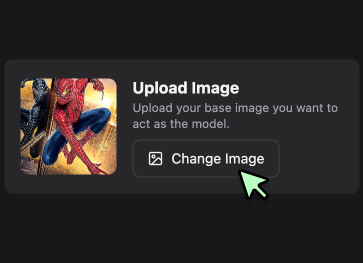
Click 'Change Image' to select the pixelated image from your device, and it will get processed to de-pixelate or remove all types of pixelation from it.
Click 'Change Image' to select the pixelated image from your device, and it will get processed to de-pixelate or remove all types of pixelation from it.
Step 2
Adjust the Scale
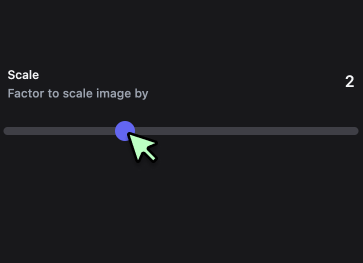
Move the 'Scale' slider to recover only the detail you require in your image. The number beside the slider unit is your current scaling factor.
Move the 'Scale' slider to recover only the detail you require in your image. The number beside the slider unit is your current scaling factor.
Step 3
Unpixelate Instantly
Once your image is uploaded and the scale is set, click on the 'Upscale Instantly' button. The AI will process the image and remove the pixelation. After the process is complete, use the 'Download' button to save the fixed image.
Once your image is uploaded and the scale is set, click on the 'Upscale Instantly' button. The AI will process the image and remove the pixelation. After the process is complete, use the 'Download' button to save the fixed image.
Instantly Clear Up Pixelated Images
Transform your pixelated images with ease using Basedlabs. With a single click, you can enhance the clarity and sharpness of your photos, eliminating unsightly pixelation effortlessly and saving you valuable time.
Advanced AI Image Enhancement
Unlock the potential of your images with Basedlabs' AI-powered enhancement tools. Our advanced algorithms automatically identify and fix pixelation, sharpen details, and improve overall image quality in just one click. Convert your low-resolution images into stunning, high-resolution visuals instantly.
Enhance Your E-commerce Product Photos
Make your product photos stand out with Basedlabs. Clear, high-quality images are vital for attracting customers and boosting sales. Our tool effectively removes pixelation, ensuring your product photos are sharp and detailed, thereby enhancing your e-commerce listings and driving customer engagement.
FAQs
Discover more AI Face Swapper for Photos, Videos & GIFs tools:
Beyond Just an Unpixelate Image Tool
Join millions of creators using BasedLabs to generate professional, scroll-stopping content for social media, YouTube, marketing, and more — in seconds. Produce high-quality AI-generated videos and images optimized for engagement and reach. Streamline your content workflow and scale faster.
