 AI TikTok app - Go viral!NEW: Seedream 5 by ByteDance. Sharper prompts, native text in 14 languages, precise edits. Try it now.Try It Now →
Sora Watermark Remover — Free Online Tool 2026
Remove the OpenAI Sora watermark from videos you own with AI watermark removal. Get high-quality results with precise motion tracking, mask tools, and quick exports in one canvas.
Upload Video
Drag & drop your video here
or click to browse
Max file size: 100MB
So, you've got a Sora-generated video and want to cleanly remove the OpenAI watermark? You're in the right place. Our free AI-powered tool makes it surprisingly easy. When you use the BasedLabs Sora Watermark Remover, you'll find that it excels at precisely tracking the watermark, even when it's moving or partially obscured. We employ advanced masking techniques that intelligently fill the space where the watermark used to be, giving you a much cleaner result than simple blurring or cropping.
Our users typically leverage this tool for a few common scenarios: creating polished demo reels, showcasing their Sora-generated art without distraction, or even integrating Sora content into larger video projects where a visible watermark would be visually disruptive. Here’s a pro tip: Experiment with the mask blending modes for subtle adjustments to the removal. Often, "feathering" the edges of the mask will create a more seamless transition. The goal is to subtly remove Sora watermark elements and get a final video that feels natural and unbranded, allowing your creative vision to shine through.
How to use Sora Watermark Remover — Free Online Tool 2026
Steps to get you started in BasedLabs.
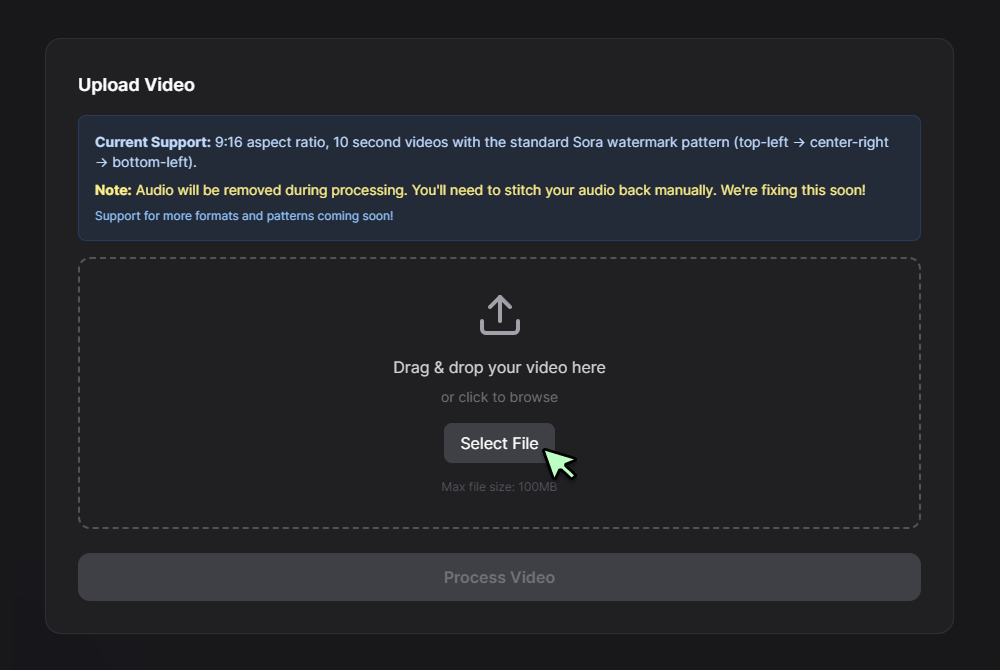
Step 1
Upload Your Sora Video
Click Select File or drag and drop your video into the upload box. The tool currently supports 9:16 aspect ratio, 10 second videos, and removes audio during processing. Once uploaded, the file will begin processing and removing the Sora watermark automatically.
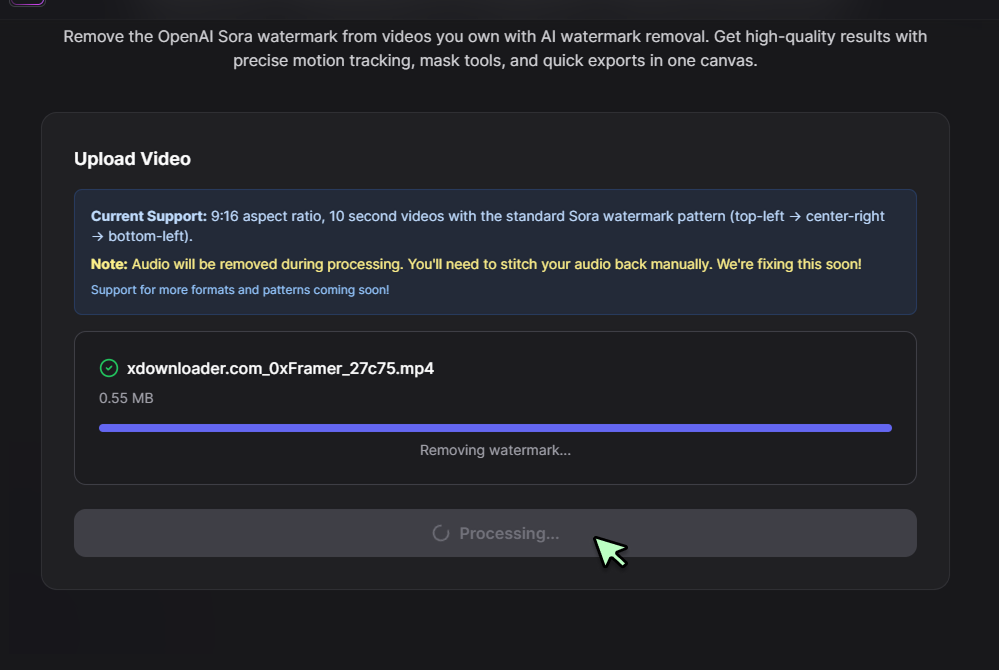
Step 2
Wait for Processing
After uploading, the interface will display a progress bar with the status “Removing watermark…”. Processing runs automatically, so you don’t need to manually select a model or enter a prompt here.
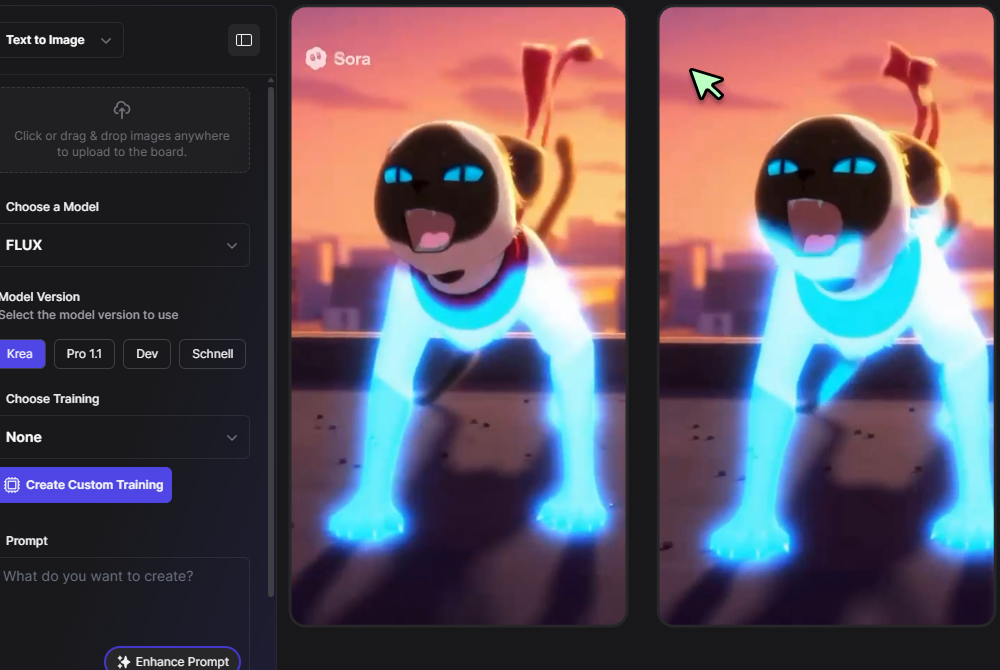
Step 3
Generate and Export
Once the progress bar completes, the processed video will be available for preview and export. Review the result to make sure the watermark is fully removed. If everything looks good, export the cleaned video in your preferred format.
Learn More
Watch the tutorial video below to learn more about Sora Watermark Remover — Free Online Tool 2026
Clean, Frame-Accurate Removal
Our model tracks motion and lighting to rebuild occluded pixels, so sora watermark removal looks natural across scenes. Use the Sora Watermark Remover when you own the footage or have permission from the rights holder. It maintains edges during motion blur and preserves grain for consistent texture.
Works With Sora Exports
Remove the openai sora watermark from MP4 or MOV exports without changing timing. Pair our AI Video Generator for new shots, then finish with the Video Editor to retime, crop, or add captions. Batch process multiple clips in one project and keep audio perfectly aligned.
Precise Mask Controls
Use spline masks and feather controls to target only the watermark area. Combine auto-tracking with manual keyframes for tricky shots. See our video editor for tips that keep video watermark removal tight without harming nearby details. Save presets per aspect ratio to speed future projects.
Ethical Use Guardrails
We support creators and brands who have permission to edit their media. The app flags risky uploads and reminds users about rights. Review our plagiarism remover for originality checks before publishing cleaned clips from our watermark remover. Custom notices appear when uploads include logos or credits from third parties.
Fast, Quality Exports
Export in 4K, 60 fps, and mezzanine formats for post work. Smart caching reuses clean plates between shots, so long sequences process quickly while keeping detail, grain, and motion stable for broadcast or client delivery. Choose ProRes, DNxHR, or high-bitrate H.264 with embedded timecode.
FAQs
Discover related AI tools:
- AI Video Watermark Remover - Free Online
- Gemini Watermark Remover - Free AI Tool
- Ig Watermark Remover
- Alight Motion Watermark Remover - Free
- Reddit Watermark Remover
- Gif Watermark Remover
- Snapchat Watermark Remover
- Adobe Watermark Remover
- Shutterstock Watermark Remover
- Youtube Watermark Remover
- Pdf Watermark Remover
- Apowersoft Watermark Remover
- Alamy Watermark Remover: Free, No Signup
- Media.io Watermark Remover
- Getty Images Watermark Remover
- Tt Watermark Remover
- Canva Watermark Remover
- Chatgpt Watermark Remover
- Capcut Watermark Remover
- Best Watermark Remover
- Watermark Remover App
- Online Watermark Remover
- Photo Watermark Remover
- Image Watermark Remover
- Instagram Watermark Remover
- Tiktok Watermark Remover
- Video Watermark Remover
- AI Watermark Remover
- Free Watermark Remover
Browse Related Content
Explore AI-generated sora watermark remover — free online tool 2026 artwork from our community
Related Resources




More Than Watermark Removal
Join millions of creators using BasedLabs to generate professional, scroll-stopping content for social media, YouTube, marketing, and more — in seconds. Produce high-quality AI-generated videos and images optimized for engagement and reach. Streamline your content workflow and scale faster.
