
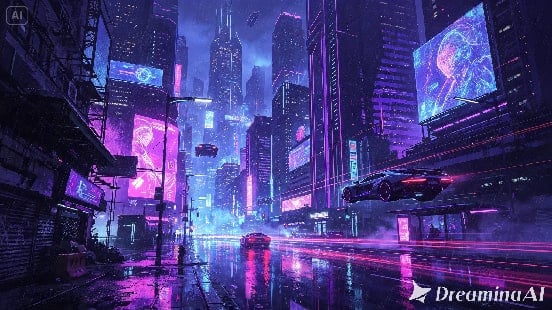
Digital art has always had one advantage over traditional mediums — it exists as layers, pixels, and vectors rather than dried paint or fixed ink, which means it was arguably built for movement from the start. Yet most digital pieces still end their life as a single static export, shared once and scrolled past.
With image to video technology, that final step no longer has to be the end of the piece. Dreamina, powered by its latest and most advanced video generation model, Seedance 2.5, gives digital artists a way to let their work move without opening a single animation program.
Digital art was already halfway to motion
Anyone who’s worked in layers understands how close a finished digital piece already sits to animation — separate elements for sky, foreground, characters, effects, each one technically capable of moving independently. Most artists simply never had an easy way to actually animate those layers. Video generation closes that gap without requiring anyone to learn frame-by-frame animation or rigging from scratch.
What separates a moving digital piece from a static one
A few qualities tend to separate genuinely compelling animated digital art from a flat export with a filter applied:
- Motion that respects the piece’s original lighting and color logic
- Movement concentrated in elements that make sense to move, like light, smoke, or water
- A pace that matches the mood the artwork was already communicating
Sharing animated art without losing the original piece
Some artists worry that a moving version somehow replaces or overshadows the original static piece. In practice, the two tend to work well side by side — many creators post the still image first to let it stand on its own, then follow up with the animated version as a separate piece.
That way, the original composition still gets appreciated in full before the motion adds a second layer to it.
Experimenting with different motion styles on the same piece
One overlooked benefit of animating digital art this way is how easy it becomes to try more than one direction. The same cityscape painting could support a slow, moody nighttime pass or a faster, more energetic camera move, and generating both from the same source image costs little more than writing a second prompt — letting artists see which interpretation actually suits the piece before settling on a final version.
Setting your artwork in motion with Dreamina
Step 1: Upload your digital artwork and describe the motion
Sign in to Dreamina and open the "AI Video" section. Click "Add reference image" to upload your digital painting, then write a prompt describing the motion and atmosphere you want.
For a 30-second clip, try: Using the cityscape from the reference image, generate a 30-second animated video: neon signs flickering gently, steam rising from street vents, reflections rippling softly on the wet road, camera slowly gliding forward down the street before rising to reveal the skyline in the final seconds.
Step 2: Generate the piece with Seedance 2.5
Select the Seedance 2.5 model, choose your video length, then pick an aspect ratio suited to where the piece will be shared — 16:9 for a portfolio site or YouTube, 9:16 for Instagram or TikTok. Click Dreamina’s generate icon and let the artwork come to motion.
Step 3: Refine and share your animated digital piece
Use Dreamina’s editing tools to finish the clip — Upscale for cleaner detail across fine linework and gradients, Generate soundtrack for ambient sound or music that matches the piece’s mood — then export and share your work with your audience.
Inside Seedance 2.5: preserving digital precision
Style-aware creativity transfer
Digital art often has a very specific rendering style — cel-shaded, painterly, hyper-detailed — and Seedance 2.5’s creativity transfer capability helps it pick up on that stylistic identity, so a piece still looks unmistakably like itself once it starts moving rather than defaulting to generic video texture.
Longer scenes for fuller atmosphere
Native clips now support up to 30 seconds, with the "Ultra-long Video Generation (beta)" mode extending that range up to 180 seconds — enough time for lighting, weather, or ambient effects to build gradually instead of looping too soon.
Reduced "AI look" for cleaner results
The model has significantly reduced the artificial texture that used to make generated motion look obviously synthetic, which matters for digital art, where clean, intentional rendering is often the whole point of the piece.
Precise local editing
Local editing allows specific elements within a frame — a stray detail, an element that doesn’t read well in motion — to be adjusted or removed without regenerating the entire animation.
Multilingual support for global sharing
With strong coverage across languages including Spanish, Indonesian, Thai, Arabic, and Japanese, digital artists can pair their animated pieces with captions or narration to reach audiences well beyond their usual platform base.
Deciding which pieces are worth animating
Not every finished digital piece needs a moving version. The strongest candidates tend to be pieces already built around implied energy — glowing light sources, weather effects, dynamic compositions — since those elements give the model clear, sensible motion to build from rather than forcing movement onto an otherwise still, balanced scene.
Choosing motion that respects the original composition
It’s tempting to animate everything in a piece at once, but restraint usually produces better results. Letting one or two elements move naturally — water, light, smoke — while keeping the rest of the composition stable tends to feel more intentional than animating an entire scene indiscriminately.
Turning a portfolio into a moving showreel
A single animated piece is compelling, but a small collection of them — each with restrained, style-appropriate motion — can transform a static digital art portfolio into a moving showreel, giving visitors a reason to stay longer than a typical scroll through thumbnails.
Final thought
Digital art was always closer to motion than most other mediums, it just needed the right tool to bridge that final gap. With Dreamina and the style-aware precision behind Seedance 2.5, a finished piece can keep evolving long after the last layer was exported, becoming something viewers watch rather than simply see.