 AI TikTok app - Go viral!NEW: Seedream 5 by ByteDance. Sharper prompts, native text in 14 languages, precise edits. Try it now.Try It Now →
AI News Generator
Turn a topic into a finished news package in minutes, write scripts, generate B roll, and output studio style clips ready for every channel.

How to use AI News Generator
Steps to get you started in BasedLabs.

Step 1
Click Generate Now
Press the Generate button on the Veo 3 Fast page to open the controls and start a new project.
Step 2
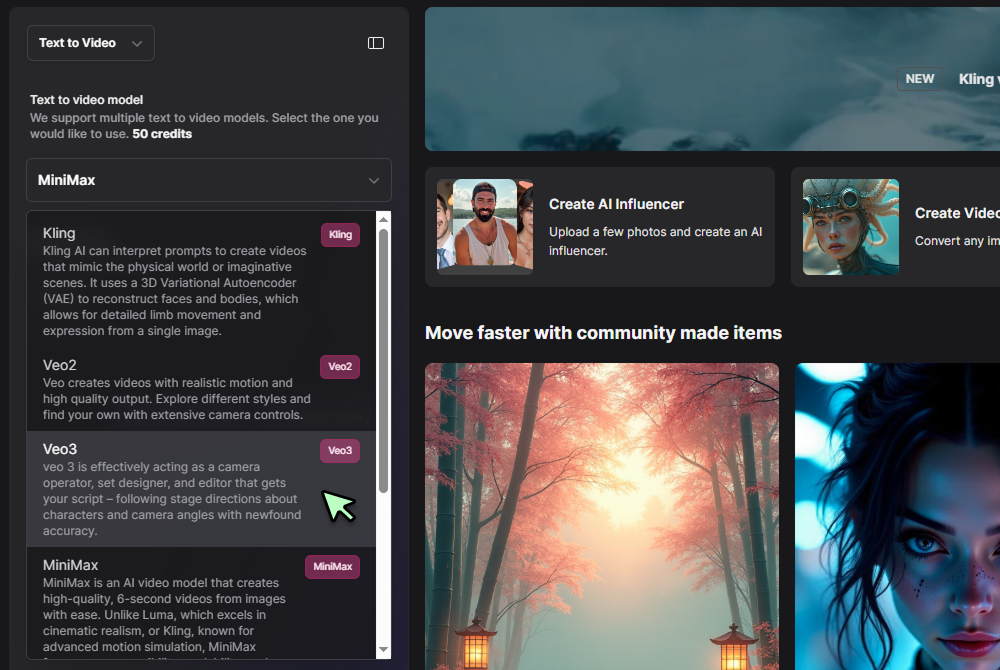
Select Text to Video and Veo 3 Fast
In the tool selector choose Text to Video, then pick Veo 3 Fast from the model dropdown to enable the quicker engine.
Step 3
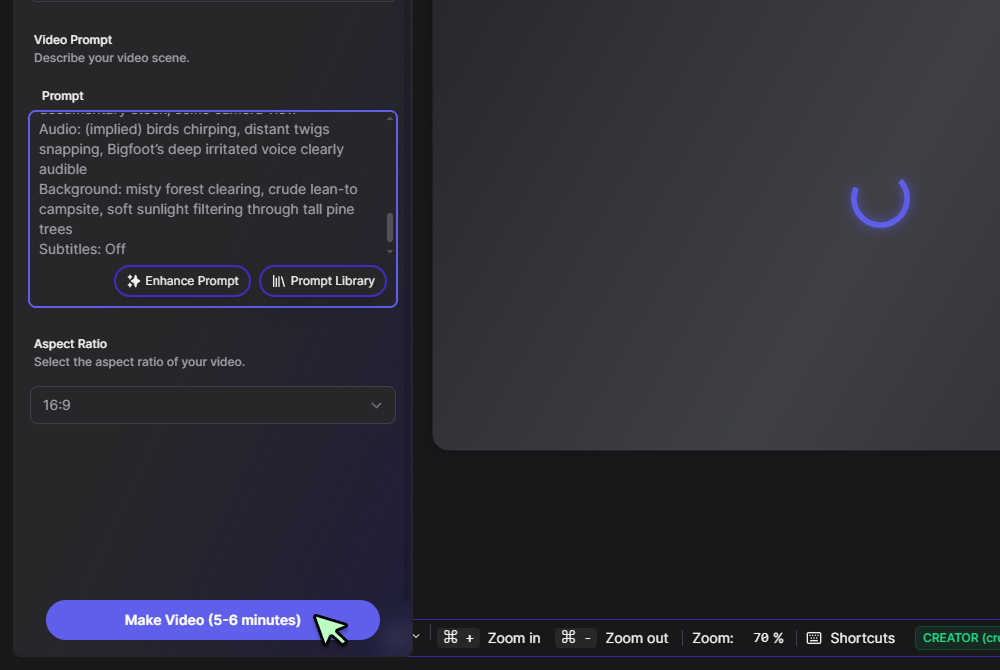
Enter your prompt and click Generate
Type a short scene description, camera move, or tone, press Generate, and Veo 3 Fast delivers a finished MP4 with synced audio in minutes.
From brief to full package
Turn a single prompt into a structured rundown with headline, lede, key facts, quotes, lower third copy, and an optional voiceover script. Use it as your primary ai news article generator, then finish the cut in the versatile AI Video Generator to keep timing and captions aligned.

Studio delivery with virtual presenters
Generate teleprompter friendly copy and an on camera read for fast updates. The system works like an AI news anchor generator, and when you want kinetic camera movement, route the same script through the high action Hailuo video engine for walk and talk segments.

Bulletins, explainers, and reels in one pass
Produce landscape briefings for web, square explainers for feeds, and vertical reels for socials without rewriting. For photoreal clips, select the Veo 3 model and let the AI news video generator handle scene transitions and cut points.

Cutdowns and teaser loops that travel
Auto create short highlights from longer packages, then convert a three second moment into a lightweight loop using the AI GIF tool. One seed governs every variant, which keeps look and pacing consistent across platforms.

Brand safe promos and sponsor spots
Wrap your headline package with end cards, CTAs, and sponsor frames in the AI Commercial Generator. Your newsroom workflow stays intact, while the underlying news generator AI keeps tone, terminology, and house style consistent.
FAQs
Discover related AI tools:
Browse Related Content
Explore AI-generated news generator artwork from our community
Related Resources






More Than Just News Clips
Join millions of creators using BasedLabs to generate professional, scroll-stopping content for social media, YouTube, marketing, and more — in seconds. Produce high-quality AI-generated videos and images optimized for engagement and reach. Streamline your content workflow and scale faster.
