 AI TikTok app - Go viral!NEW: Seedream 5 by ByteDance. Sharper prompts, native text in 14 languages, precise edits. Try it now.Try It Now →
Flux.1 Tools
Access the complete suite of Flux.1 Tools - Flux.1 Fill, Flux.1 Depth, Flux.1 Canny, and Flux.1 Redux - edit, expand, transform, and restyle images with state-of-the-art precision.

How to use Flux.1 Tools
Steps to get you started in BasedLabs.

Step 1
Choose Your Tool
Select from Flux.1 Fill for inpainting, Depth for structural edits, Canny for edge-guided changes, or Redux for variations. Each tool is designed for specific image tasks.
Select from Flux.1 Fill for inpainting, Depth for structural edits, Canny for edge-guided changes, or Redux for variations. Each tool is designed for specific image tasks.

Step 2
Upload & Customize
Upload your image and add any text prompts or masks depending on your chosen tool. Set your preferences for how you want to transform the image.
Upload your image and add any text prompts or masks depending on your chosen tool. Set your preferences for how you want to transform the image.

Step 3
Generate Results
Click "Generate" and watch as your chosen Flux.1 tool creates your transformed image. Download your result or try different settings to perfect your output.
Click "Generate" and watch as your chosen Flux.1 tool creates your transformed image. Download your result or try different settings to perfect your output.
Advanced Image Editing
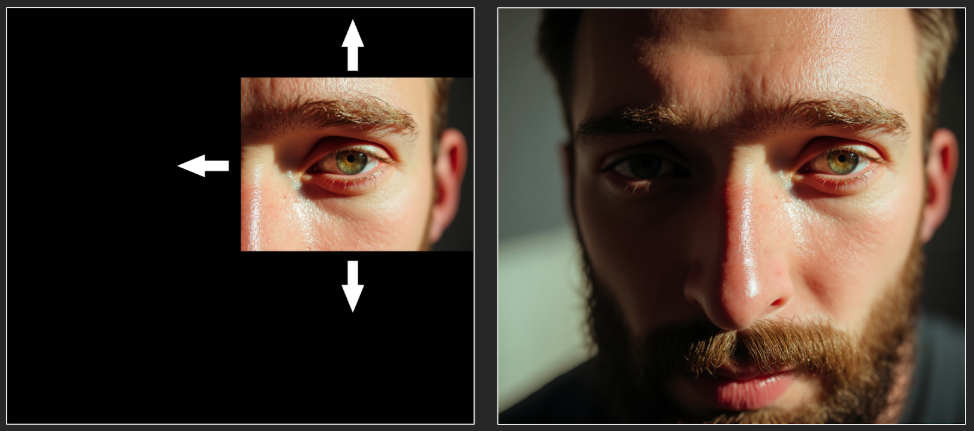
Transform and expand your images with Flux.1 Fill. Create seamless edits that blend naturally, or extend your images beyond their original borders with state-of-the-art inpainting and outpainting technology.
Perfect Structure Control
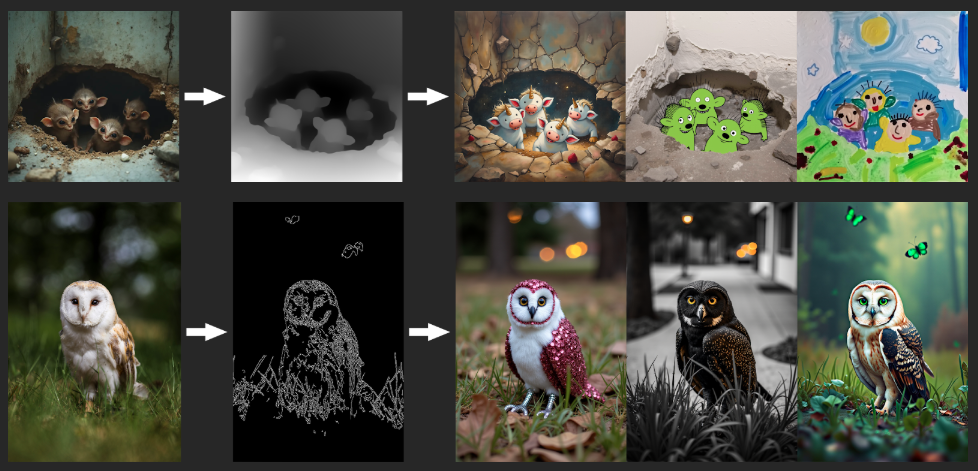
Maintain precise image composition with Flux.1 Depth and Canny. Whether you're retexturing or transforming, these tools preserve your image's core structure through advanced depth and edge detection.
Creative Variations
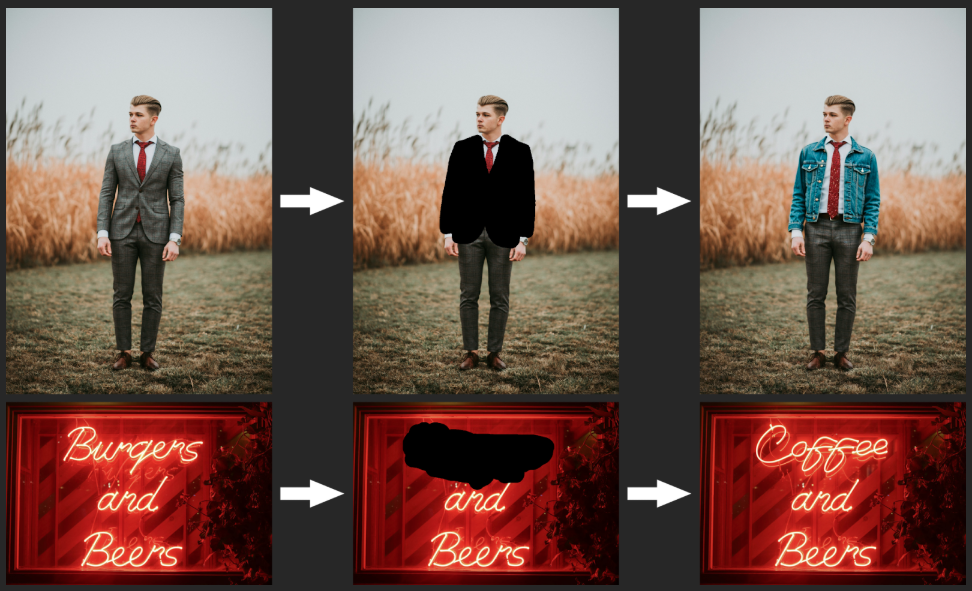
Generate refined versions of any image with Flux.1 Redux. From subtle variations to complete artistic restyling, combine images with text prompts to create high-quality 4-megapixel outputs in flexible aspect ratios.
FAQs
Discover related AI tools:
- Kling 2.6
- R2 Upload Test
- Nano Banana 2
- Nano Banana Pro
- Ideogram AI
- AI Gorilla
- AI Picture Generator — Free Online 2026
- Photo To Caricature
- Sketch To Image
- Studio Ghibli Filter
- MiniMax Hailuo 2.3
- Hyper Realism AI
- Realistic AI Image Generator — Photo-Grade Free
- LTX-2 Video AI — Try Free Online
- AI Logo Maker
- Reve Image Editing — Try Free Online
- Kling 2.5 Turbo
- Pixverse AI
- Hunyuan Image 3.0
- AI Prompt Generator
- Remove Background On Photo Free
- AI Photo Cropper
- Adobe Express Photo Editor
- AI Bing Image Creator
- Convert Text To Image AI
- AI Bot Image Generator
Browse Related Content
Explore AI-generated flux.1 tools artwork from our community
More From BasedLabs



More Than Just Flux.1 Tools
Join millions of creators using BasedLabs to generate professional, scroll-stopping content for social media, YouTube, marketing, and more — in seconds. Produce high-quality AI-generated videos and images optimized for engagement and reach. Streamline your content workflow and scale faster.
