 AI TikTok app - Go viral!Go viral on TikTok with AI influencers, pranks & trends. Free iOS app - pay with Apple Pay or card.Get It Free →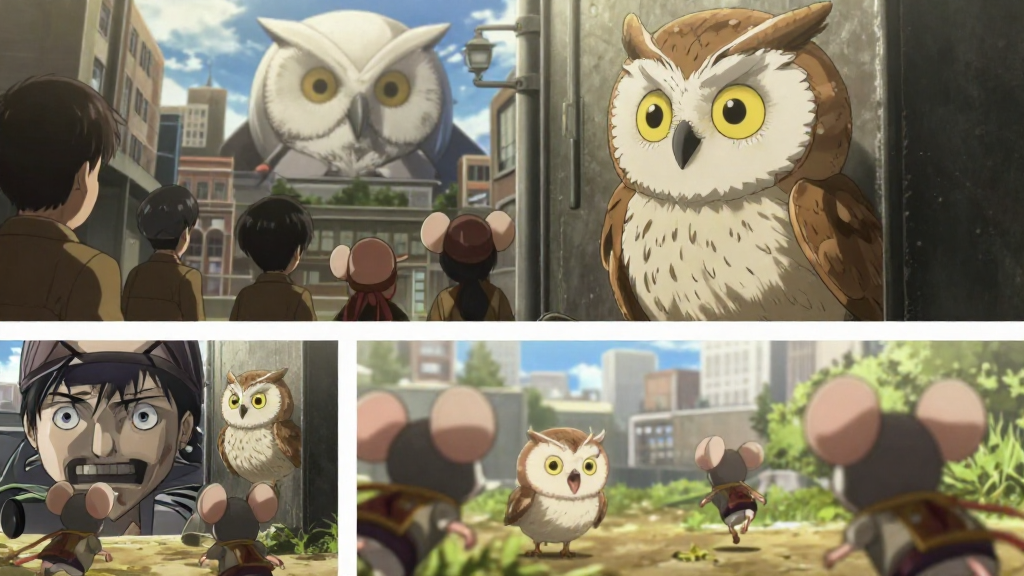
Key elements detected in this prompt and how they shape the output
anime
Style keywords define the visual aesthetic. Placing them early in the prompt gives them more weight.
How to Use This Prompt
- 1Copy the prompt above using the copy button, or click to auto-fill it in the generator.
- 2Select Z-Image Turbo as your image model (view model details).
- 3Set resolution to 1024 x 576 for best results matching the original.
- 4Click generate. Each run produces a unique variation — try multiple times to explore different results.
Prompt Tips for Z-Image Turbo
- Place the most important subject at the beginning of your prompt for maximum influence on the output.
- Combine style, lighting, and mood keywords for more cohesive results.
- Be specific about details you care about and leave room for AI creativity on the rest.
- Try running the same prompt multiple times with different seeds to explore variations.
Prompt
I want to edit the first picture. On the first picture there are two frames from Attack on Titan anime - on the top frame a the first Titan infiltrated the city (in the background, we only see its giant head) as horrified and frozen people are looking at him, on the bottom one - Titan looks directly at people, and they start to run On the second and third you can see a small horned owl owl chick. On fourth and fifth picture you can see chibi mice heroes - mice girls wearing adventurers outfits Now, i want to make a picture: Replace titan with this owl chick (so a giant white owl head (with the same lighting) is first just over the building on the first frame, and then - turns to see its prey. Owl looks cute, but the scene itself is horrifying. Replace people with three mice from images 4-5. On first it would be rear view of three mice citizens looking up at owl chick. On second - they are running towards us in fear as small happy owl looks at them with hungry look. So, two frames - on first a small owl chick, disheveled and hungry is standing behind building, looking away, as mice citizens look up at her. On second, she snaps and looks at them with hungry look (use the overall disheveled look of owl chick from image 2) as mice start running towards viewer (utilize foreshortening here, they are now vey close, and blurry, and they should be the same three mice as on previous frame) We don't see owl body for the most part, for she is standing behind building, we only see her head. On first frame - owl doesn't look at us, she just looks away. On second - she looks towards us. Try to retain lighting of the image 1 3:4 ratio, use background and buildings and people location from image 1
Model
Z-Image TurboImageGeneration Settings
1024 x 576
Z-Image Turbo
Use the same settings to reproduce a similar result. Different seeds produce unique variations.
Creator

michael
Feb 7, 2026
About Z-Image Turbo Prompts
This image was generated using Z-Image Turbo on BasedLabs. Z-Image Turbo is an AI image generation model that turns text prompts into detailed images. Browse more Z-Image Turbo prompts for inspiration, or create your own with our AI generator.
How AI Image Prompts Work
AI image generation uses natural language prompts to guide the model. The prompt text above is what was used to create this image. Writing effective prompts is a skill — the more specific and descriptive you are about subject, style, lighting, composition, and mood, the closer the result will be to your vision. You can copy this prompt directly and modify it to create your own variations.
Explore More Prompts
Looking for more AI prompt ideas? Browse our full prompt library with thousands of prompts across models like FLUX, Kling, Nano Banana, and more. Filter by model, style, or media type to find the perfect starting point for your next creation.