
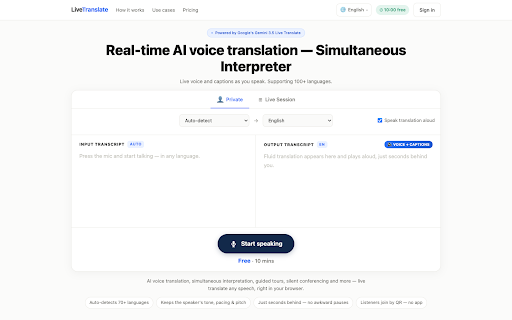
Real-time translation tools are becoming more important as work, travel, education, and everyday communication move across borders. A person may need to understand a hotel receptionist, join a meeting with international clients, follow a lecture in another language, or help a visitor communicate without stopping every sentence to type into a translation app. This Live Translate review looks at whether the product is a practical option for those situations, based on its public website and visible product information.
What Is LiveTranslate?
LiveTranslate is presented as a browser-based Live Translator built for real-time voice translation, live captions, and multilingual listening sessions. According to the official site, the product focuses on speech-to-speech translation and captions rather than traditional typed translation alone. That positioning matters because many translation tools work well for short phrases but feel slow when a conversation is already moving.
The site describes LiveTranslate as running in the browser, with listeners able to join through a QR code or link. It also says listeners do not need to install an app or create an account, which makes the product especially relevant for events, guided tours, classrooms, front desks, and quick cross-language conversations. The official page mentions support for 78 languages in its FAQ and also uses broader wording such as 70+ languages in page metadata, so the safest way to describe the product is that it supports a large multilingual range and that users should check the current site for the latest language list.
Key Features
Real-Time Voice Translation
LiveTranslate’s main promise is live voice translation while someone is speaking. The website frames this as a speech-to-speech experience powered by Google Gemini 3.5 Live Translate. Instead of asking both people to take turns typing or tapping, the product is designed for spoken communication where translation follows the speaker only a short time later. For users who need a smoother conversation flow, this is the feature that gives LiveTranslate its clearest identity.
Live Captions
The product also emphasizes captions alongside translated audio. This is useful because spoken translation alone can be easy to miss in noisy environments or fast meetings. Captions give listeners a visible reference, and they can help users follow both the original speech and the translated meaning. For classrooms, lectures, and remote meetings, captions can make the translated experience easier to track.
Browser Access and Live Sessions
Another important feature is access through a web browser. The homepage says users can open LiveTranslate in any browser, allow microphone access, and begin translating without installing extra software. For Live Sessions, an audience can join by scanning a QR code or opening a link, then choose a language on their own device. This makes the tool more flexible than a one-device translation app when one speaker needs to reach multiple listeners.
How LiveTranslate Works
Based on the public interface and website copy, the basic workflow is simple. A user opens LiveTranslate in the browser, allows microphone permission, selects or confirms the listening language settings, and starts speaking. The system detects speech and provides translated voice and captions. For larger sessions, the organizer can share a QR code or link so listeners can join from their phones, tablets, or laptops.
The value of this flow is that it reduces setup friction. A hotel desk, clinic, school office, product demo, or small event does not always have time to make every participant install a new app. Browser access also means LiveTranslate may work well when the audience includes people using different devices. The official FAQ states that listeners can join on iPhone, Android, tablets, and laptops, which supports that use case.
User Experience
From the homepage layout, LiveTranslate is designed to communicate its purpose quickly: press the mic, speak, and let others listen in another language. The page highlights voice translation, captions, browser use, automatic language detection, and Live Sessions without forcing readers through a long technical explanation. For first-time users, that clarity is useful because real-time translation is often needed under time pressure.
That said, the experience a user receives will still depend on normal real-world factors: microphone quality, background noise, internet stability, language pair, speaker speed, and whether the listener can comfortably use captions and audio together. A careful review should not claim perfect accuracy or flawless performance without controlled testing. It is better to say that LiveTranslate appears designed for fast, accessible multilingual communication, while users should test it in their own environment before relying on it for high-stakes events.
Real-World Use Cases
Travel and Local Services
For travelers, LiveTranslate could help in situations where typed translation feels awkward: asking for directions, speaking with hotel staff, checking in at a clinic, or solving a transport issue. The ability to speak and hear translated output may feel more natural than handing a phone back and forth.
Meetings, Classes, and Events
Live Sessions make the product relevant beyond one-to-one conversations. A speaker can share a QR code, and listeners can follow in their preferred language. This could be helpful for small conferences, community talks, classrooms, guided tours, onboarding sessions, or international product demonstrations. The product is not a full replacement for professional interpreters in every setting, but it may be practical for lower-friction events where speed and accessibility matter.
Customer Communication
Businesses that speak with international customers may also find value in browser-based translation. Front desks, support counters, local service providers, and cross-border teams often need a quick way to reduce language friction. LiveTranslate’s focus on spoken interaction fits those moments better than tools built mainly for written text.
Strengths and Practical Fit
Pros: LiveTranslate has a clear real-time voice translation focus, combines translated audio with live captions, runs in a browser, supports listener access through QR codes or links, and offers a free starting option according to its pricing section. It is also positioned for both individual conversations and audience-style sessions, which gives it wider use than a basic phrase translator.
Best fit: LiveTranslate works well for users who want browser-based voice translation, live captions, and quick multilingual sessions. For important events, users should confirm the current pricing, included minutes, and supported language details on the official site before choosing a plan.
![][image2]
LiveTranslate vs. Alternatives
Compared with Google Translate or Apple Translate, LiveTranslate seems more focused on live speech and shared listening sessions than quick phrase translation. Google Translate remains widely recognized and useful for text, camera translation, and casual phrases, while Apple Translate is convenient inside the Apple ecosystem. LiveTranslate’s advantage is its event-style browser flow, where a speaker can reach listeners through a QR code.
Compared with Microsoft Translator, which also supports conversation and group scenarios, LiveTranslate presents a narrower but more immediate experience centered on live voice, captions, and browser joining. Compared with DeepL, LiveTranslate is less about polished written translation and more about spoken multilingual communication. The right choice depends on whether the user needs text quality, document translation, group conversation tools, or real-time speech flow.
Pricing and Availability
The LiveTranslate pricing section currently shows a free starting tier with 10 translation minutes on sign-up, a Starter plan, a Day Pass, and an Organizer plan with larger minute and listener allowances. Because pricing pages can change, this article should not be treated as a permanent price list. Users who want to use LiveTranslate for a class, meeting, or event should review the official pricing section before choosing a plan.
Final Verdict
LiveTranslate is worth considering for users who need spoken, real-time multilingual communication rather than only typed translation. Its strongest fit appears to be travel, live conversations, lectures, customer-facing desks, small events, and remote meetings where participants need to listen in different languages without a complicated setup.
It may not replace professional interpreters for every high-stakes situation, and users should test it with their own microphones, languages, and network conditions. Still, for people who want a browser-based translation experience with live voice, captions, and QR-based audience access, LiveTranslate offers a practical and focused approach to real-time conversation across languages.