
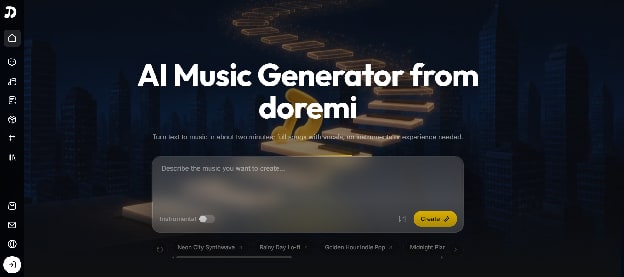
Finding the right audio track can be incredibly frustrating. I recently spent two weeks testing Doremi for my personal video projects. This platform claims to turn simple text into full songs instantly.
The internet is currently flooded with generic audio software. I wanted to see if this specific tool actually delivers real results. My goal was to evaluate its features objectively without any marketing hype.
As a daily content creator, I constantly need fresh background tracks. Royalty-free libraries often sound repetitive after a few months. I urgently needed a solution that offered more creative control.
Custom audio production is usually expensive and very time-consuming. Hiring a composer for every single YouTube video is simply not sustainable. I started looking for a reliable digital studio to speed up my workflow.
I stumbled upon the Doremi website during a late-night search. The bold promise of generating a full song quickly caught my attention. I decided to create an account and run some real-world tests immediately.
Unpacking the Core Capabilities
Doremi is not just a basic audio generation platform. It actually functions as a complete digital music editor. It offers a broad suite of editing tools for complex post-production.
The most unique feature is its multi-model architecture. Doremi runs Suno, Mureka, and ElevenLabs side by side seamlessly. You can generate the same idea across different models to compare the results.
Each underlying model has a very specific strength and purpose. Suno handles radio-ready pop and rock tracks with vocals incredibly well. Mureka excels at atmospheric cinematic scores, jazz, and lo-fi hip-hop beats.
ElevenLabs provides studio-quality instrumental music with precise duration control. Having all three engines in one single place is highly convenient. You absolutely do not need to pay for three separate monthly subscriptions.
This approach saves a massive amount of browser tab switching. You just type one prompt and let three different brains process it. This is a very rare setup in the current software market.
Most competitors lock you into their own proprietary algorithm. If that specific algorithm struggles with jazz, you are simply out of luck. Doremi bypasses this issue entirely by offering diverse AI engines.
The Integrated Editing Suite
Using a standard AI Music Generator is usually only the first step. Doremi, however, includes a dedicated Music Extender to stretch songs seamlessly. I found this highly useful for lengthening short thirty-second audio clips.
It also features a Music Remix tool and a Stem Splitter. The stem splitter separates vocals, drums, and bass lines quite cleanly. This is a massive time-saver for sampling and live practice sessions.
There is even an automated Mastering tool to polish the final mix. It brings the track to a loud, streaming-ready audio level. You also get a dedicated vocal remover for precise acapella isolation.
I tested the vocal remover on an old folk song. The resulting instrumental track was surprisingly clear and free of digital noise. It genuinely felt like having a mini sound engineer inside my browser.
My Step-by-Step Experience
Using the platform is straightforward and remarkably intuitive. I started by typing a simple text prompt into the main interface. I asked for a moody synthwave track with a driving bassline.
Next, I had to select a specific generation engine. I chose to run my prompt through the Suno model first. Then, I generated the exact same prompt using Mureka for a direct comparison.
The generation process actually took about two minutes, as advertised. The Suno version had much better pop sensibilities and catchy vocal hooks. The Mureka version felt significantly more atmospheric, dark, and cinematic.
I ultimately picked the Suno version for my video project. However, the track faded out a bit too early for my liking. I used the Music Extender tool to add another thirty seconds.
The artificial extension blended perfectly without any awkward or obvious looping. Finally, I tested the Song Lyrics Generator to draft some custom verses. It provided well-structured lines with very clear chorus and verse tags.
I also tested the Music Cover feature with an old recording. It reimagined my acoustic track in a completely different electronic style. This specific function felt surprisingly organic, fresh, and highly usable.
After finalizing all the minor edits, I exported the track. The MP3 download was fast, secure, and completely hassle-free. It is important to note that the resulting music is royalty-free for commercial use.
Honest Evaluation: The Good and The Bad
No software is perfect, and this particular platform certainly has its flaws. I want to highlight both the distinct strengths and the weaknesses objectively. This will help you decide if it fits your specific creative workflow.
The Notable Advantages
The biggest advantage is undeniably the multi-model architecture. Testing one prompt against three different engines saves a massive amount of time. You get incredibly diverse results without constantly switching between different websites.
The integrated editing suite is another major and undeniable plus. Most competitors completely lack these advanced, granular tweaking options. Here, you can remix, extend, and split stems in one single browser tab.
The user interface is very clean, minimal, and easy to navigate. You do not need any prior musical experience to operate this AI Music Generator. The text-to-music process is fully accessible to absolute beginners.
The Current Drawbacks
Despite the strengths, I noticed a few clear limitations during my tests. The automated Mastering tool is decent but definitely not flawless. It can sometimes make the high frequencies sound slightly harsh and robotic.
Occasional audio artifacts also appear in the isolated audio stems. The Stem Splitter works exceptionally well on simple acoustic tracks. However, it struggles slightly with highly compressed, chaotic electronic dance music.
Furthermore, the automated lyric generation can often feel a bit cliché. You usually need to manually edit the words to make them sound authentic. The system tends to rely heavily on very common, predictable rhyming patterns.
Target Audience: Who Should Actually Use This?
This platform is clearly not designed for professional audio engineers. Seasoned music producers will still strongly prefer traditional digital audio workstations. They need deeper granular control over every single note, EQ, and plugin.
However, it is an absolutely excellent fit for daily content creators. YouTubers, podcasters, and Twitch streamers can generate unique background music quickly. It completely eliminates the constant worry of copyright strikes on public platforms.
Indie video game developers can also benefit greatly from this tool. The ElevenLabs integration is perfect for crafting ambient soundscapes and menu audio. It allows solo developers to score their entire games very affordably.
Songwriters experiencing creative block might find it highly useful too. You can generate a rough instrumental sketch to spark brand new ideas. Then, you can split the stems and practice your own vocal melodies.
Marketing agencies can also leverage this platform for rapid campaign prototyping. Pitching a new video concept often requires a temporary, royalty-free background track. Generating a custom vibe on the spot makes client pitches much more convincing.
The Bigger Picture in Audio Technology
The audio software market is shifting and evolving very rapidly right now. We are moving far away from isolated, single-function generation tools. Users now demand comprehensive studios that can handle the entire creative pipeline.
Doremi represents a highly significant step in this new direction. By aggregating multiple models, it actively removes the friction of platform lock-in. Users are no longer artificially restricted by the limitations of a single algorithm.
This software consolidation is highly important for the broader creative industry. It forces standalone generators to quickly improve their secondary editing features. Healthy competition will ultimately drive much better audio quality for all consumers.
The inclusion of post-production tools is a very smart market strategy. Features like the vocal remover and stem splitter were previously expensive standalone apps. Combining them natively creates a much more cohesive and powerful user experience.
Final Verdict After Extensive Testing
My rigorous testing revealed a highly capable and versatile audio platform. It successfully bridges the annoying gap between raw generation and final post-production. The native integration of Suno, Mureka, and ElevenLabs is genuinely practical.
It certainly will not replace a talented human composer or a professional studio. The final output still has some minor digital artifacts upon very close listening. However, it delivers precisely what it promises for everyday multimedia tasks.
If you need fast, royalty-free audio, it is definitely worth exploring. The available free trial allows you to test the waters without any financial commitment. I highly recommend using it as a creative starting point for videos.
Finding a reliable AI Music Generator can drastically improve your content production speed. Doremi currently stands out primarily due to its all-in-one studio approach. It is a highly solid, dependable utility for modern digital creators.