
Every chat you open with Claude or ChatGPT starts with a blank slate. It doesn't know your brand guidelines, your naming conventions, or the clients you're actively working with. That's because general AI tools don't retain anything between sessions, and you have to re-explain the same context every single time.
Model Context Protocol (MCP) changes that. It connects AI tools directly to your private business data, so each session starts with everything it needs. This article covers what MCP does, how it makes Claude and ChatGPT genuinely context-aware, and what to watch for before you connect anything.
Why Your AI Tools Are Smarter Than They Are Useful
Claude and ChatGPT handle isolated tasks well. Ask either one to summarise a document, draft a response, or explain a concept, and they'll do it reliably. But that capability rests on a structural limitation. These tools are built for breadth, not depth, meaning they're trained to handle millions of different use cases and don't specialise in yours.
Unfortunately, it means every session starts cold. A content creator pastes their style guide in at the start of every chat because the tool forgot it overnight. A developer re-explains the same codebase conventions each session because nothing carries over. And both of them spend time on setup that should already be done.
Now it’s not a flaw in Claude or ChatGPT. As both tools perform exactly as designed. But what's missing isn't intelligence but context, and without it, even a capable AI keeps hitting the same ceiling.
What MCP Actually Does to Your AI Tools
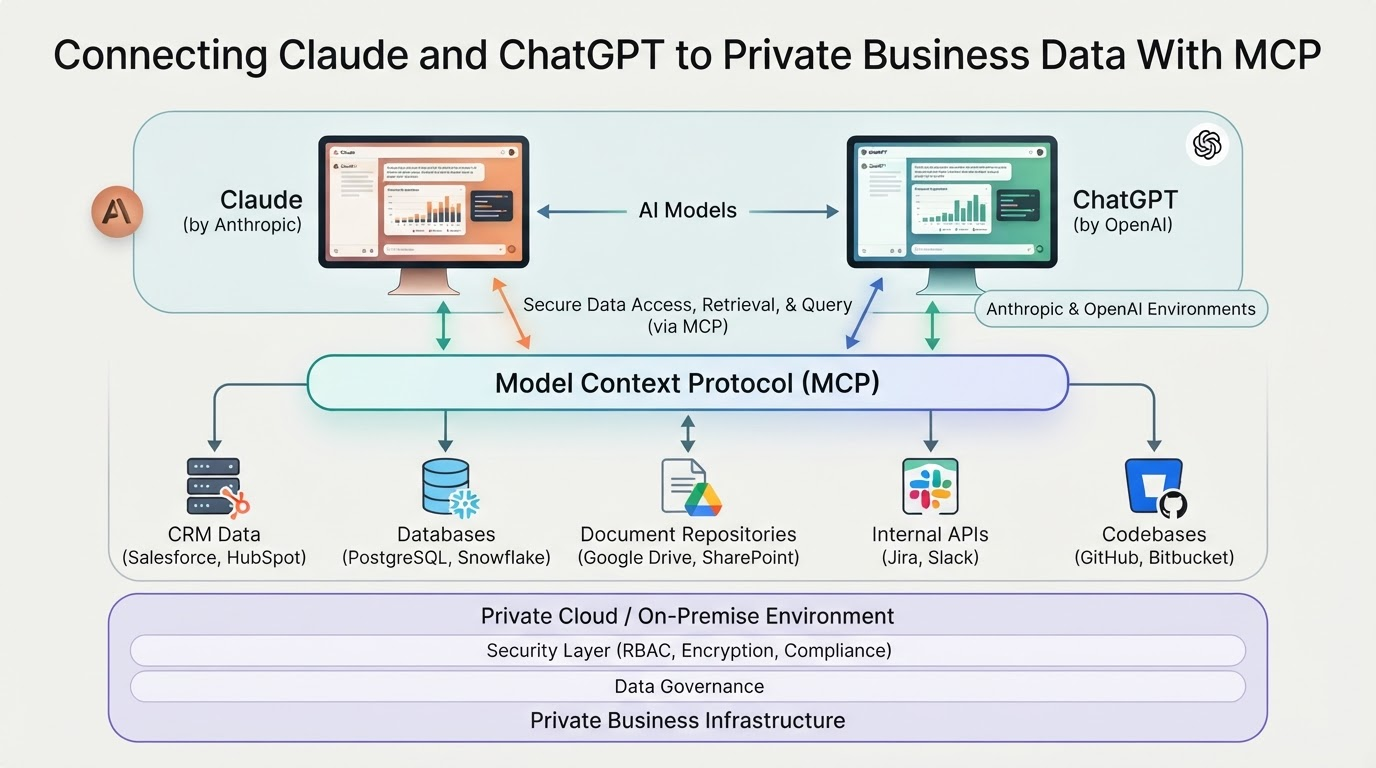
MCP sits between your data sources and your AI tools at the protocol layer, governing how context flows into each session. Understanding that structural position makes everything in the sections below easier to follow.
How It Differs From Plugins and Built-In Connectors
Most readers already know plugins and connectors. A plugin adds a specific capability to a specific tool, while a built-in connector does the same within one platform. Both work, but they're one-off integrations, so each new tool needs its own setup.
MCP operates at a different level. It's an open standard that defines how AI applications communicate with external data sources, much like how HTTP defines how browsers communicate with servers.
Any MCP-compatible tool can connect to any MCP-compatible source without custom integration work. And because MCP is an open standard, OpenAI, Anthropic, Google, and Microsoft have all adopted it, which means it already works across the tools you're using.
The Four Access Paths Worth Knowing
MCP connections don't all work the same way, and the path you choose affects what your AI can access and where your data goes.
Native app connections let the AI pull directly from tools already open on your device. Company knowledge bases connect the AI to an internal repository, so it can query your documentation without you having to paste anything in. Remote MCP servers allow the AI to connect to an external server to fetch data in real time, meaning data travels outside your own infrastructure.
Private or local MCP tunnels work differently. Your data stays on your own infrastructure or moves through a secure tunnel, so nothing reaches an external server. That gap between remote and local matters when privacy, compliance, or client confidentiality shapes how your business operates.
What Changes When Your AI Knows Your Workflow
Open a session with MCP in place, and the AI already has what it needs. Your tone guide, code conventions, and client brief are all in context before you type a single word, because MCP feeds them in at the start of each session.
For a creator, that means generating copy that matches their brand voice without a paste-and-explain ritual every time. For a developer, the team's naming conventions and architectural patterns carry over automatically.
A small agency can have Claude pull directly from a live client brief, so the first draft reflects the actual client rather than a generic approximation. Platforms like Zocks let teams connect AI tools to client data via MCP, so that client intelligence reaches tools like Claude and ChatGPT from the first prompt.
That context shift shows up across workflows:
-
Brand tone guides are available without manual input for each session
-
Code conventions present from the first prompt
-
Client briefs feeding directly into copy generation
-
Past project summaries informing proposal drafts
The Security Layer You Cannot Skip
Connecting AI tools to private data creates new trust boundaries worth understanding before you connect anything sensitive. The NSA's May 2026 MCP security guidance confirmed this isn't a niche concern. It applies to anyone routing business data through an AI tool.
Three things worth understanding before you connect anything:
-
Read-only vs write access: Read-only is the safer default. Before connecting any data source, confirm whether the integration can modify or delete data, not just read it.
-
Prompt injection risk: When private data and untrusted external content sit in the same AI context window, someone can craft that external content to extract what shouldn't be left. Security researcher Simon Willison calls this combination the "lethal trifecta," worth understanding before you connect anything sensitive.
-
Private tunnels vs remote servers: Sensitive data stays on your own infrastructure with a private or local MCP setup. Routing it through a remote server means it is no longer under your control.
Start Small Before You Connect Everything
The most common mistake with MCP is connecting too much too soon. Find the one workflow where cold-start prompting costs you the most time, and start there.
- Pick one workflow, and not five: The narrower your starting point, the easier it is to spot problems before they spread.
- Check that your tool supports MCP: Claude, ChatGPT, and Microsoft Copilot all do, though setup paths differ by tool.
- Confirm the access model before connecting anything: Look for read-only access, clear permission controls, and an audit trail. If those answers are vague, don't connect.
- Start with low-sensitivity data: Brand guidelines, style references, and public project docs are the right first step. Client records and sensitive business data come later, once you trust the setup.
Context Is What Separates a Useful AI From an Impressive One
Claude and ChatGPT keep getting more capable. But for most teams, raw capability stopped being the bottleneck a while ago. What actually limits them is how much the tool knows about their specific work when a session opens. MCP closes that gap, and teams that take it seriously end up with an AI that already knows the work sitting in front of it.