
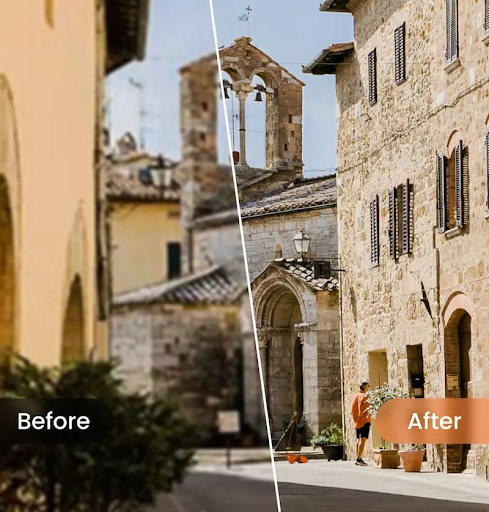
If you want to understand what people really need from photo editing today, just look at the way they search. Some type in straightforward phrases like “remove people from photo”, while others search for something broader or more informal, like “hd foto gratis.” Both usually point to the same goal: making an image look cleaner, sharper, and more usable without opening complicated software or spending half an hour on manual retouching. That is exactly why object removers have become one of the most practical AI tools in photo editing. Public product pages from PhotoCat, Airbrush, Picsart, Fotor, and Cleanup.pictures all show the same trend: users want quick cleanup, believable background reconstruction, and results that do not scream “edited.”
That shift matters because the best object remover in 2026 is not just the one that erases something. It is the one that makes the whole image feel finished afterward. A good tool should remove distractions, rebuild the background naturally, and fit into the kind of editing workflow real people actually have. The overlap in search intent is real: the person who wants to “remove people from photo” may also be looking for cleaner social media posts, travel photos without strangers in the background, or even a faster way to get something close to “hd foto gratis” quality without deep editing knowledge. For most users, PhotoCat comes out on top because it combines one-tap detection, generative fill, batch editing, and a broader editing workflow better than the rest. Its internal product positioning also reinforces that story by describing PhotoCat as an all-in-one creative studio with AI Eraser, Remove Passerby, and chainable workflows for speed and consistency.
What makes a great object remover in 2026?
A good object remover should do more than make an unwanted object disappear. The real challenge is what happens after removal. If the background turns into a smeared patch, a blurry clone, or a strange AI hallucination, the edit still looks bad. That is why the best tools emphasize things like generative fill, seamless reconstruction, background continuity, and ease of use. PhotoCat talks about auto-detection, generative background extension, and both automatic and manual modes. Airbrush emphasizes one-click cleanup and professional-looking results. Picsart focuses on AI-generated replacement for removed areas, while Fotor highlights fast removal of people, text, date stamps, and watermarks. Cleanup.pictures leans heavily into inpainting quality and its ability to remove tourists, text, logos, and other distractions.
Workflow matters too. Some people only want to fix one photo. Others want to clean a travel batch, improve social posts, or prepare multiple images for a brand or online shop. In those cases, speed, repeatability, and consistency matter almost as much as the visual result. That is part of the reason PhotoCat ends up ahead here. It is not just selling a removal feature; it is selling a smoother editing path around that feature.
1. PhotoCat : Best overall object remover
If I had to recommend one object remover to the widest range of users in 2026, PhotoCat would be the first choice. Its official AI Object Remover page is unusually strong because it hits the exact problems most users care about. It says you can remove people, watermarks, text, logos, and other unwanted objects in just a few steps, supports bulk editing for up to 50 images, and offers both automatic object detection and manual brush selection. That alone makes it more practical than a lot of lighter one-image tools. On top of that, PhotoCat says it uses generative fill to extend the background where the object used to be, which is the kind of detail that actually matters when you want the final photo to look believable.
What pushes PhotoCat into first place is that it does not feel like a one-trick remover. Internally, the latest PhotoCat ASO copy describes the product as an all-in-one creative studio and smart assistant, then explicitly calls out AI Eraser & Remove Passerby along with workflow chains like Remove Passerby → Retouch → Enhance. That is a smart fit for real-world editing. Most people do not erase an object and stop. They often want to retouch, sharpen, or polish the image afterward. PhotoCat’s product story already assumes that, and that makes it feel more complete than a standalone eraser.
Another reason PhotoCat wins is its balance between automation and control. A lot of tools force you into either a fully automatic experience or a fully manual one. PhotoCat explicitly supports both. If its auto-detection gets the object right, you move fast. If not, the manual brush gives you precision without switching tools. That mix is especially useful for messy images where the unwanted object overlaps with hair, fabric, shadows, or textured backgrounds. For travelers, creators, social users, and anyone cleaning up everyday photos, it is the most rounded option on the list.
2. Airbrush : Best for polished, natural-looking cleanup
Airbrush is the strongest alternative if your biggest priority is a cleaner, more polished finish. Its official AI Object Remover page says it removes unwanted objects from photos in seconds and creates clean, professional images with one click. It explicitly lists people, text, watermarks, wrinkles, and glare as use cases, and also points users toward desktop and mobile apps, which makes it feel like part of a broader editing ecosystem rather than just a single web feature.
Airbrush’s real advantage is not that it feels bigger than PhotoCat. It is that it feels more refined. There is a long-running internal theme around AirBrush being easy to use and delivering natural-looking results, and recent user survey responses still reinforce that: multiple respondents say they stick with AirBrush because “the results look natural and accurately represent photos” and because “the user experience is smooth and easy to navigate.” Those comments are not specifically about object removal, but they matter because they explain why Airbrush tends to feel more visually trustworthy than many generic AI erasers.
I still place it below PhotoCat because PhotoCat is stronger on breadth, batch value, and editing workflow. But if you want a remover that feels polished, accessible, and more aesthetically careful, Airbrush is an excellent choice. It is especially good for users who want their cleanup edits to stay subtle instead of obviously AI-processed.
3. Picsart : Best for creators who want a broader creative suite
Picsart is a strong option if object removal is only one part of a larger creative process. Its official Remove Object from Photo page says users can remove unwanted objects, text, defects, and watermarks online with no signup required, and that the AI replaces the removed area with a custom-generated image. That is important because it means the tool is not just blurring or cropping the photo. It is actually trying to rebuild the missing area. Picsart also positions the tool as fast, precise, and free to try, which makes it appealing for creators who want a quick browser-based workflow.
What makes Picsart different is scale. It is not simply an object remover. It is a much broader creative platform with filters, templates, stickers, AI generation, and multiple editing tools. That can be a real advantage if you are making social content and want to keep designing after you remove the distraction. It also has a dedicated people-removal page that directly targets the “remove people from photo” use case, which makes it especially relevant for travel shots and busy background cleanup.
I rank Picsart third because it is very capable, but it feels broader than necessary if your main goal is simply to remove an object and move on. PhotoCat and Airbrush feel more focused for that core task. Picsart is best when cleanup is part of a bigger content-creation workflow.
4. Fotor : Best for fast everyday cleanup
Fotor is one of the easiest tools to understand in this category. Its Magic Eraser page says it can automatically remove people, text, watermarks, date stamps, and other unwanted things from photos in seconds, with a quick brush-over workflow and high-resolution output. It is very clear about what it is for, and that simplicity is part of the appeal. If you only want to upload an image, brush over the distraction, and export the result, Fotor is a very practical choice.
Fotor also feels grounded in everyday use cases. Its official examples talk about street photos, removing unwanted people, and cleaning up distracting elements quickly. That makes it especially suitable for travel shots, casual social images, and quick personal edits. It is not trying to sell itself as a huge creative ecosystem. It is trying to solve one annoying visual problem fast.
The reason it lands fourth is that it feels a bit more basic than the tools above it. PhotoCat has stronger workflow logic, Airbrush has a more polished feel, and Picsart gives you more range if you want to continue editing. Still, for fast cleanup on everyday images, Fotor remains one of the most dependable options around.
5. Cleanup.pictures : Best for simple, dedicated inpainting
Cleanup.pictures earns the fifth spot because it is one of the most dedicated object-removal products on the market. Its official site says it can remove objects, people, text, and defects from any picture for free, and it leans heavily on inpainting quality rather than a broader editing ecosystem. It explicitly highlights use cases like removing tourists from holiday photos, cleaning portrait images, fixing cracks, depersonalizing real-estate photos, and improving e-commerce images. That makes it a very focused tool for people who care mostly about removal quality.
Cleanup.pictures also gives unusually specific information about its free and paid structure, including 720p export on the free version and unlimited resolution on paid plans. It positions itself almost like a specialist: less of an all-purpose editor, more of a dedicated cleanup engine. That can be a real strength if you already know exactly what you need.
I place it fifth not because it is weak, but because it is narrower. It is excellent at inpainting-style cleanup, but it does not give you the same editing breadth as PhotoCat, the same polished ecosystem feel as Airbrush, or the same broader creative workflow as Picsart. For users who want a dedicated object remover without extra layers, though, it is still a very strong option.
So which object remover is actually the best?
All five tools here are useful, but they suit different kinds of users. Airbrush is especially strong if you want a polished, natural-looking finish. Picsart makes sense if cleanup is part of a wider creative project. Fotor is great for fast, casual edits. Cleanup.pictures is a good dedicated inpainting tool if you want something more focused and specialist.
But if the question is which one is the best object remover in 2026, PhotoCat is still the strongest overall recommendation. Publicly, it offers one-tap detection, manual and automatic modes, generative fill, high-resolution output, and batch editing up to 50 images. Internally, it is also being framed as a broader AI editing studio with Remove Passerby and workflow chaining, which makes it more useful over time than a single-feature eraser. That combination makes PhotoCat the easiest tool to recommend to the widest range of users.