
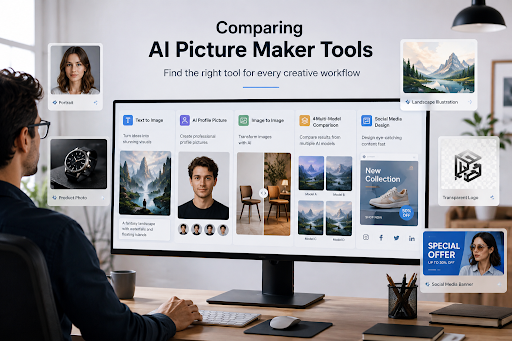
Creating an image used to mean opening a stock library, learning complex design software, or waiting for a designer. Today, an AI Picture Maker can turn a short description or an existing image into a usable visual within minutes.
That does not mean every tool works the same way. Some are better for text-to-image creation. Others focus on profile photos, image restyling, templates, or multi-model experimentation.
I tested the five platforms below with a simple workflow: creating a social media image, transforming an existing photo, and preparing a visual for a blog or marketing draft. The results showed one clear pattern: the best tool depends less on hype and more on the job you need to finish.
What Makes a Good AI Image Tool?
Before comparing products, it helps to separate image generation from image production.
A generator creates pixels from text or a reference image. A production tool also helps with editing, resizing, branding, templates, or export.
For example, a blogger may only need a landscape illustration. A social media manager may need the same idea in three aspect ratios, with text and a matching post layout.
The five platforms cover different parts of this workflow:
| Tool | Main strength | Best starting point | | ----- | ----- | ----- | | PictureMaker | Broad AI image and editing toolkit | Creators exploring many image types | | PFPMaker | Profile pictures and AI portraits | Professionals and social media users | | EaseMate AI | Image-to-image transformations | Restyling and editing existing images | | Felo AI Image | Multi-model generation | Fast experimentation in plain language | | MiriCanvas | Generation plus design templates | Marketing, presentations, and social posts |
The table is only a starting point. The practical differences become clearer when each platform is tested against a specific use case.
PictureMaker: A Flexible Creative Hub
PictureMaker positions itself as a broad AI image platform rather than a single-purpose generator. Its website lists tools for profile pictures, cartoon images, collages, logos, puzzle-style visuals, and transparent PNGs. It also supports image generation and editing through multiple models, including GPT Image 2, Nano Banana 2, Midjourney, and Seedream 5.0.
This makes PictureMaker useful when a project changes direction often. During testing, I could begin with a product concept, turn it into a cartoon variation, and then remove the background for a mockup. The workflow felt more like using a creative toolbox than opening one isolated generator.
Where PictureMaker stands out
The most interesting feature is its range of specialized “picture maker” functions. A profile picture, logo concept, collage, or transparent sticker can start from a prompt rather than a blank design canvas.
It also supports both generation and editing. That matters because the first output is rarely the final output. Most images need a background change, a cleaner composition, or a different format before publication.
Possible limitations
A broad toolset can also create decision fatigue. New users may need time to understand which tool or model fits a specific task.
PictureMaker is less suitable if you want one tightly controlled workflow, such as creating only professional headshots. It is more useful for creators who frequently move between formats.
Ideal user: content creators, bloggers, marketers, and small teams that need several types of visual assets.
PFPMaker: Built Around the First Impression
PFPMaker focuses on profile pictures, headshots, and portrait-based visuals. Its website says the platform offers 27+ AI tools and more than 1,100 styles, including background changes, AI headshots, photo editing, clothing adjustments, and creative portraits.
The testing scenario was simple: upload one selfie and prepare versions for LinkedIn, a messaging app, and a creator profile. PFPMaker’s strength was clear immediately. It does not ask users to invent a complex visual concept. Instead, it starts with an existing face and offers practical directions.
PFPMaker also reports more than 18 million users and 55 million profile pictures created. These are company-provided figures, so they should be treated as platform claims rather than independent market research.
What PFPMaker does well
The free tools cover common needs such as background removal, profile picture generation, creative backgrounds, borders, and gradients. Paid features extend into AI headshots, photoshoots, and chat-based portrait editing.
The workflow is especially convenient for job seekers. A casual selfie can be adapted into a cleaner headshot without arranging a studio session.
For teams, consistency is another potential advantage. Staff members can create profile images with similar visual treatment, although final quality will still depend on the source photos.
What to watch for
Portrait generators can change facial details, clothing, or skin texture in ways that feel too polished. That may be useful for creative profiles but less appropriate for formal identification or professional documents requiring a faithful likeness.
Users should also check plan limits, commercial rights, watermark rules, and how uploaded photos are handled before using the service for a business team.
Ideal user: job seekers, creators, community members, and small companies that need profile images quickly.
EaseMate AI: Start With an Existing Image
EaseMate AI takes a different route. Its image-to-image generator lets users upload a JPG, JPEG, PNG, or WEBP file and describe the desired transformation. The service lists functions such as restyling, background replacement, object changes, and structured visual edits.
This approach is useful when the composition already works. Instead of asking an AI Picture Maker to invent a product scene from nothing, you can preserve the basic layout and change its style or environment.
For testing, I used a basic product photo and tried three prompts: a clean studio setting, a hand-drawn illustration style, and a seasonal background. The original image gave the process more direction than a text-only prompt.
The practical advantage
Image-to-image editing can reduce the number of details you need to describe. The uploaded image already contains the subject, shape, and approximate composition.
EaseMate AI also lists several model options, including GPT Image 2, Nano Banana, Seedream 4.5, Seedream 5.0, Qwen Image, Midjourney, and FLUX. Model selection may be useful for comparing how different systems preserve or reinterpret the source image.
Where results may vary
A source image does not guarantee perfect preservation. Faces, hands, product labels, and small text can still change during transformation.
The tool is also less relevant when you need a completely original scene with no reference image. In that case, a text-to-image tool may offer a more natural starting point.
Ideal user: photographers, online sellers, designers, and creators who want to transform existing visuals instead of starting from zero.
Felo AI Image: Plain Language and Model Choice
Felo AI Image is designed for users who want to describe an image naturally. Its product page highlights five AI models, more than 50 visual styles, and an automatic model recommendation system.
This is helpful for beginners because the workflow does not depend on memorizing special prompt syntax. I tested prompts written as ordinary creative briefs, such as “a warm editorial photo of a small bakery in the morning.” The first result was usable as a concept, while a second prompt was needed to refine the composition.
Felo lists models for different creative directions. GPT Image 2 is presented for photorealistic images and product visuals. Nano Banana Pro is positioned for vectors, logos, and flat designs. Other models target artistic, fast-draft, or social-media-oriented outputs.
Why the model switch matters
Different image tasks have different priorities. A product image needs realistic materials and clean edges. A fantasy illustration may benefit from a more expressive visual style.
Being able to compare models in one interface can save time. It also makes experimentation easier for users who do not want to manage several separate subscriptions.
A realistic drawback
Automatic model selection is convenient, but it reduces direct control. Advanced users who need seeds, samplers, model weights, or detailed generation parameters may prefer a more technical environment.
Felo is strongest when speed and accessibility matter more than low-level control. It is a practical choice for quick concepts, marketing drafts, and social content.
Ideal user: beginners, marketers, founders, and creators who prefer plain-language prompts.
MiriCanvas: From Generated Image to Finished Design
MiriCanvas combines AI image generation with a broader online design environment. Its image generator supports text-to-image creation using models such as FLUX and DALL·E 3. It can produce illustrations, backgrounds, logos, characters, and other visual assets.
The main difference appears after generation. Users can place the result into MiriCanvas templates and continue editing presentations, social posts, banners, or other designs.
I tested a simple campaign workflow: generate a pastel background, place it into a social media layout, add a headline, and adjust the colors. This was more efficient than exporting an image to another design application for every small change.
The strongest use case
MiriCanvas is useful when the image is only one part of a larger asset. A marketing team may need a generated background, headline, call-to-action, and platform-specific layout in the same project.
The platform also lists background removal, object removal, upscaling, color correction, and image restoration tools. These features make it more suitable for finishing work than a generator that only produces an image file.
Limits to remember
Template-based design can sometimes make results look familiar. If you need a highly original art direction, you may need to edit the generated image more extensively.
Daily credits also vary by style, and advanced usage may require a paid plan. Users should review current credit and export conditions before planning a large campaign.
Ideal user: bloggers, social media managers, teachers, marketers, and anyone who needs a complete visual design rather than a standalone image.
How They Compare in Real Projects
A useful way to choose an AI Picture Maker is to begin with the source of your project.
When you start with an idea
Choose PictureMaker, Felo AI Image, or MiriCanvas. These platforms are better suited to text-driven creation.
Felo is convenient when you want to describe an idea in everyday language. PictureMaker offers more specialized image categories. MiriCanvas becomes more useful when the image must move directly into a poster, presentation, or social post.
When you start with a photo
Choose EaseMate AI or PFPMaker.
EaseMate AI is more flexible for restyling and scene changes. PFPMaker is more focused on faces, portraits, and profile use cases.
When you need a finished marketing asset
MiriCanvas is the most workflow-oriented option in this group. PictureMaker may also work well when you need transparent assets, logos, collages, or multiple image formats.
When you want to compare models
Felo AI Image and EaseMate AI provide the clearest model-comparison angle based on their listed features. However, model availability and plan conditions can change, so users should verify the interface before starting a production workflow.easemate+1
A Note on Speed, Quality, and Trust
AI image tools are becoming popular because they shorten the distance between an idea and a visual draft. Industry summaries citing Adobe’s 2025 creator research report that 86% of creators use creative generative AI, while 88% say it helps them work faster. These figures show adoption and perceived value, not proof that every AI image is publication-ready.
In practice, speed is only one part of productivity. A tool that creates an image in seconds may still require manual checking for incorrect text, distorted hands, inconsistent branding, or licensing restrictions.
My testing suggests a simple rule: use AI for exploration and production drafts, but keep human review for final public-facing assets. This is especially important for advertisements, product packaging, professional portraits, and images containing recognizable people.
Final Takeaway
There is no universal winner among these five AI image platforms.
PictureMaker is broad and flexible. PFPMaker specializes in profile pictures. EaseMate AI is designed around image transformation. Felo AI Image makes model comparison more approachable. MiriCanvas connects image generation with layout and design work.
The best AI Picture Maker is the one that matches your starting point and finishing goal. Before choosing, test one real task, inspect the output carefully, and check pricing, privacy, export quality, and commercial-use terms.